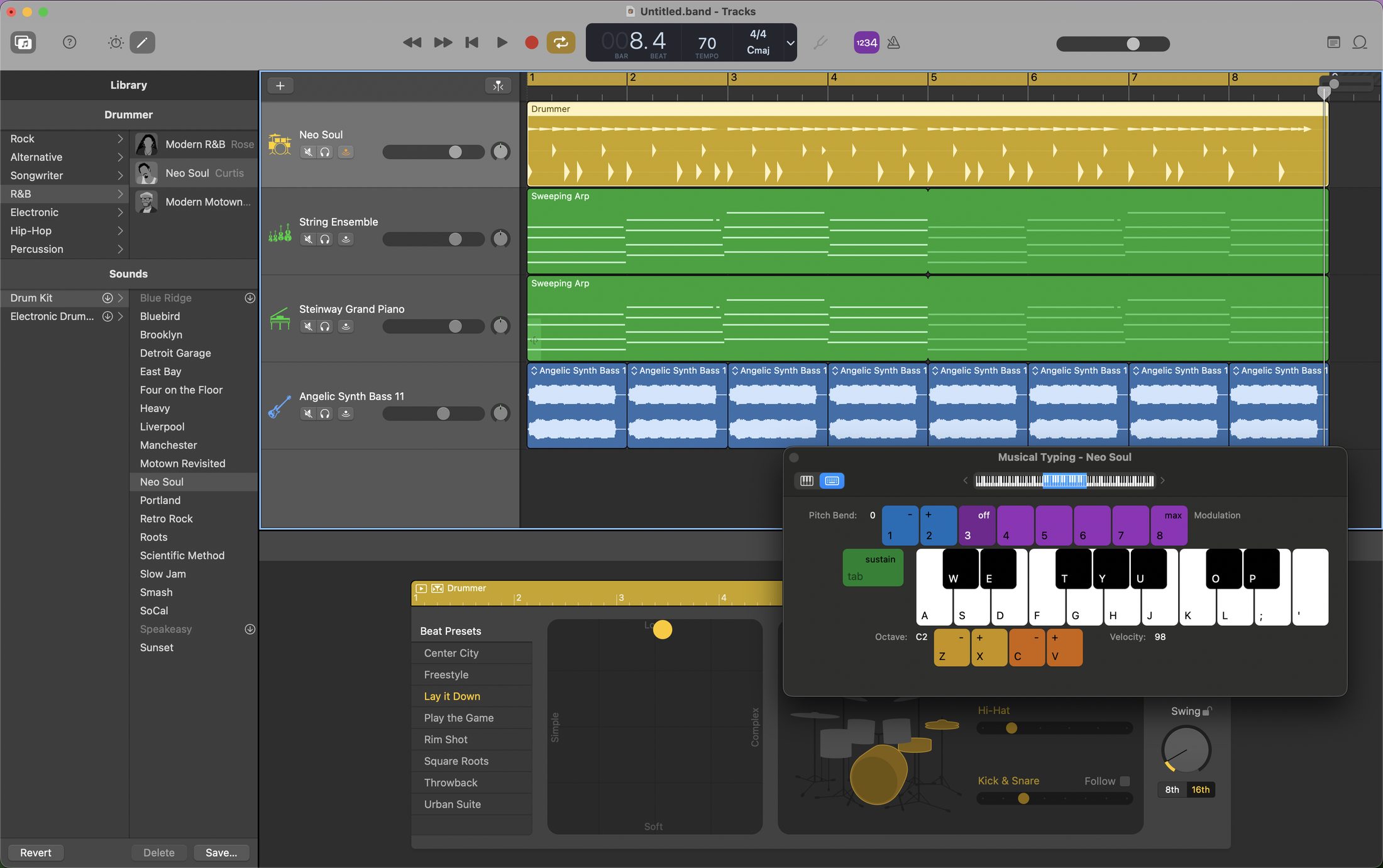
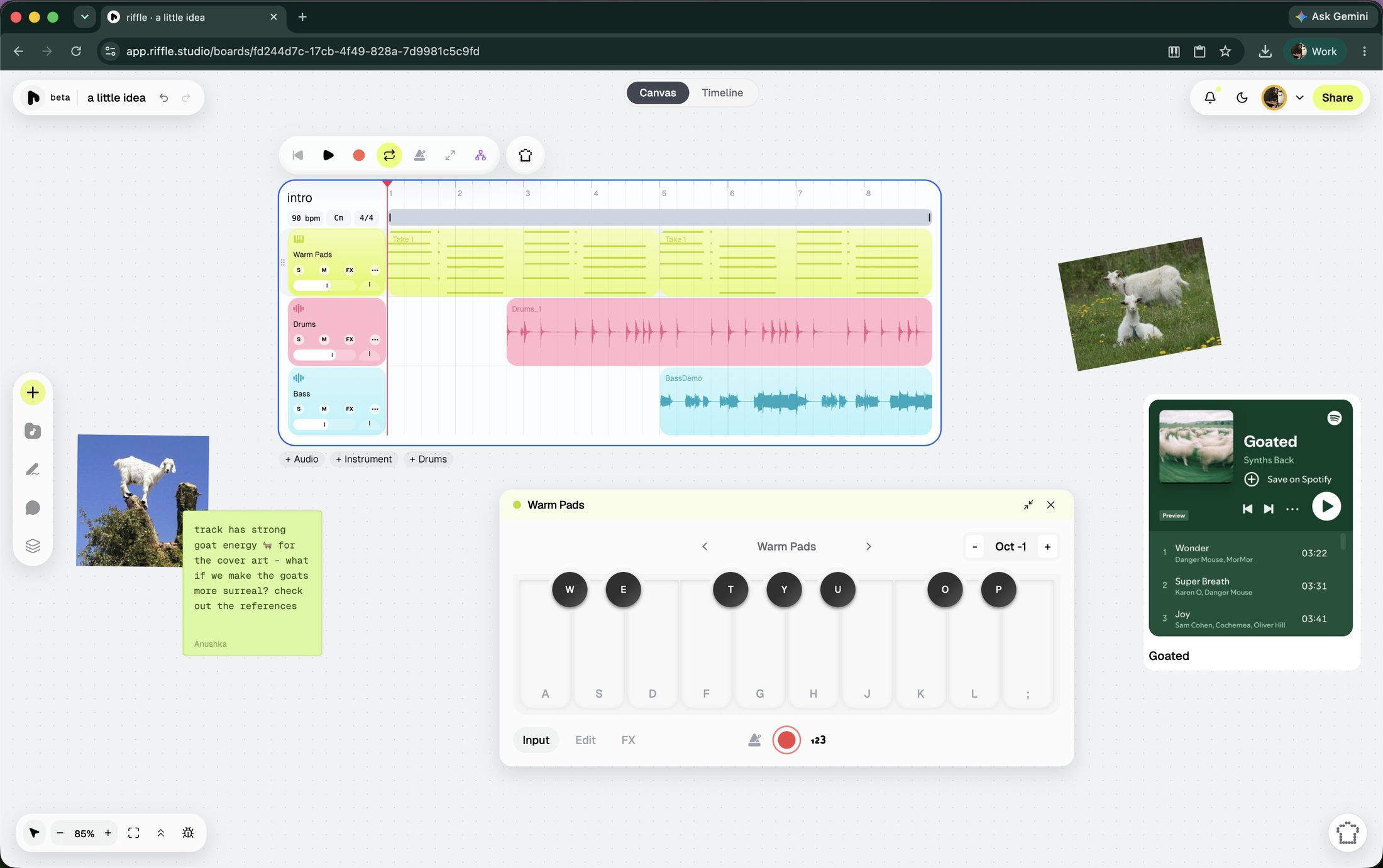
riffle and GarageBand take pretty different approaches to that. GarageBand is a full-fledged traditional desktop DAW. riffle is trying to rethink what the workspace itself should look like.
at a glance
| riffle | GarageBand | |
|---|---|---|
| What it runs on | Any browser | Mac and iOS only - no Windows, no Android |
| Price | Free | Free, but only on Apple hardware |
| To start | Open a tab | Download from the Mac App Store or iOS App Store |
| Workspace | An infinite canvas to explore ideas + timeline view for when you want to lock in | The traditional timeline that can support up to 255 tracks |
| Collaboration | Real-time, remote collaboration | None - single-user, with iCloud sync across your own Apple devices |
| Works offline | No - needs a browser and a connection | Yes, fully offline once installed |
| Built-in library | Genre-organized samples and instruments | Deep - Apple Loops, session drummers, Smart Controls, Amp Designer and Pedalboard for guitar/bass |
Which one's right for you?
Choose GarageBand if you want:
- A capable traditional DAW
- Offline access
- Deep loops, instruments and recording tools
- Something free on Apple devices
Choose riffle if you want:
- A more open-ended way to start and develop ideas
- Real-time collaboration
- A canvas where audio, notes, images and references can live together
- AI that works with your project rather than generating an entire song
- A browser-based workflow that works across devices
GarageBand: a closer look
GarageBand is the gateway drug to DAWs. There’s a lot packed in. You get a huge library of ready-made sounds and loops, virtual drummers, and tools for recording and shaping guitars and bass. You can keep adding layers as your song grows, and your projects can move between your Mac, iPhone and iPad through iCloud.
The main limitation is the Apple ecosystem. There's no official Windows or Android version. It's also a solo tool: you can work on your own projects across devices, but two people can't edit the same project live.
If you want to learn a traditional DAW, record instruments, work offline, or already live in the Apple ecosystem, GarageBand is hard to beat.
riffle: infinite canvas for music
riffle is a browser-native modern musical ecosystem, built for how music actually gets made today. Open a board and there are several ways in: record audio into your mic, play a virtual instrument, drag in a sample to set the vibe, jam with the sampler, use/remix a template, or ask sous chef (our intelligent, ethical, assistive AI) for a starting point. The canvas also accepts images, embeds, and notes, so reference material lives right next to the music instead of in a separate tab.
Real-time collaboration is one of riffle's core features. Invite friends or collaborators to edit the board and build a track with you live, or bring someone in as a comment-only collaborator if you're looking for feedback.
When a stack is ready, turn it into a drop: a track or stack shared publicly, straight from riffle. Give it a cover art, and decide whether it stays private, goes fully public, or gets sent directly to whoever needs to hear it. Anyone can listen and comment through a drop link - no download or account required.
Your work isn't trapped in the platform once you're done, either. Export lets you choose specific stacks or individual stems, downloadable as .wav or .daw files, ready for any tool you may want to use, including GarageBand.
Sous chef is an AI co-producer that lives on every riffle board. On principle, it does not generate full songs - what it generates are samples, 2/4/8/16 bar loops you duplicate, chop, stretch, and reshape however you like. It can split a track into two or six stems, detect tempo & key of imported audio files, and edit clips directly on the board. You can also talk to sous chef, if typing isn't your thing.
The same assistant also picks up less glamorous jobs - one-click mixing and mastering, listening to what you've made and giving specific, honest notes on what to change, and more. By default, changes the sous chef makes are previewed before they're applied.
Also, riffle does not and never will use models that aren't ethically trained. The same principle shows up in how sous chef behaves too - it favors surfacing a sound that already exists over generating a new one, and when it does generate, it aims for the smallest, cheapest version.
riffle is currently in beta and free for early users.
faq
Is there GarageBand for Windows?
No. GarageBand is officially available on Apple devices. riffle runs in a browser, so you can use it on Windows, ChromeOS and other platforms.
Can I use riffle and GarageBand together?
Yep. You can export stems or full stacks from riffle as .wav or .daw files and bring them into GarageBand.
Is riffle a DAW?
riffle is a music-making tool, but it doesn't work like a traditional DAW. Instead of starting with a linear timeline and building from left to right, you get an infinite canvas where you can collect ideas, experiment, arrange them, and collaborate. There's also a timeline mode for when you're actually ready to lock in.
Can I collaborate with other people in riffle?
Yes. Multiple people can work on the same board in real time, or you can invite someone just to listen and leave comments.
Does riffle use AI to make songs?
Sous Chef can generate samples and loops, but the idea is to give you material to work with rather than hand you a finished song. It can also edit your board, manipulate audio, mix and master, and give you feedback on what you've made.
Is riffle free?
riffle is currently in beta and free for early users.
riffle is free while we're in beta.
open a board and make something in the next few minutes.
free · no download · no card required